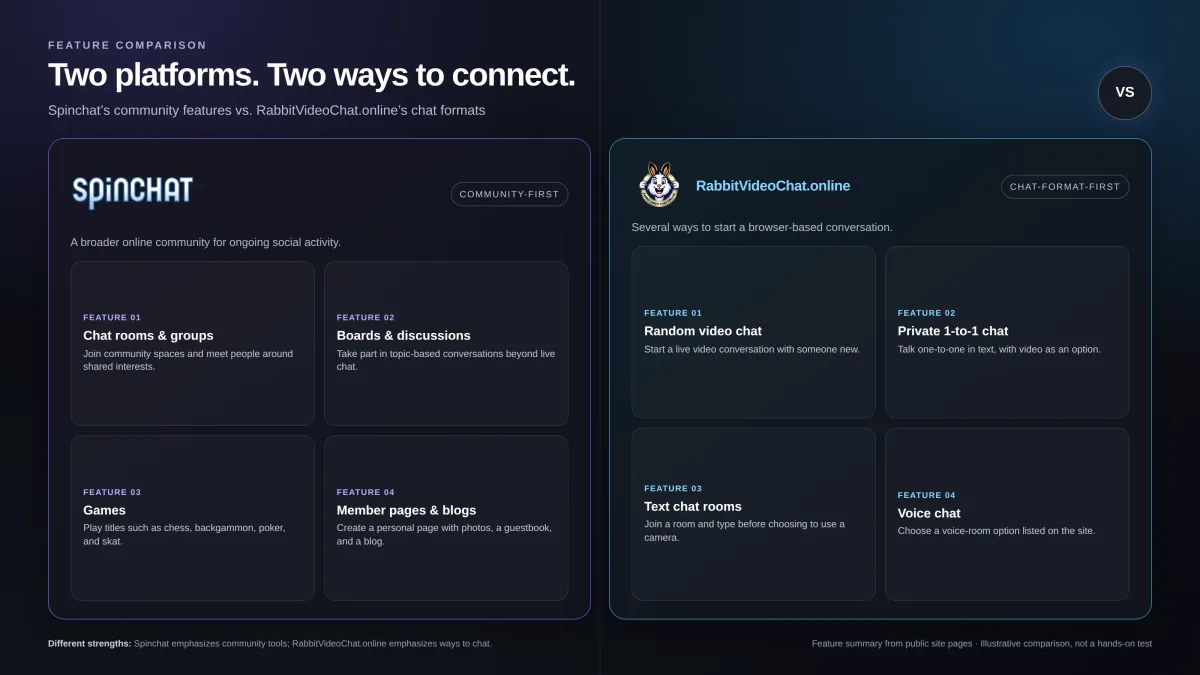
Short answer: For U.S. adults who want to start a casual browser video conversation without creating a long-term account, Rabbit Video Chat is the better fit. Its public pages list random 1-to-1 video, private chat, text rooms, and a short start flow. Spinchat is the stronger choice for people who want a broader community with chat rooms, profiles, discussion boards, groups, and games. The trade-off is that Spinchat requires registration to enter its main chat, while Rabbit’s no-account start still asks for a username, age, avatar/gender, and country. Both services are free to start, but their products are quite different. This comparison is based on the services’ public pages checked November 19, 2026; it is not a hands-on test.

Spinchat vs Rabbit Video Chat at a glance
| Feature |
Rabbit Video Chat |
Spinchat |
| Best for |
Quick browser-based video or text-first conversations |
A continuing community with games and social features |
| Main formats listed |
Random video, private 1-to-1 chat, text rooms; voice rooms are also linked |
Chat rooms, discussion boards, groups, member pages/blogs, and games |
| Account and start |
No long-term account required; the start form asks for username, age, avatar/gender, and country |
Registration is required to enter the main chat; the form asks for nickname, gender, email, and birthday |
| Price to start |
Free to start; the terms say the service may show ads and features can change |
Core community described as free; optional VIP membership is listed at €2.50/month |
| Mobile/browser |
Says it works in a mobile browser without an app download |
Links to a separate mobile version; registration is still part of the main chat path |
| Privacy note |
No public profile or long-term account is required, but the policy says technical data may be processed |
Privacy policy explains profile, chat-log, and report handling; homepage says email and birth date stay private |
| Best pick when… |
You want to try a quick 1-to-1 chat and leave or skip easily |
You want games, boards, profiles, and a more established community structure |
The table reflects what the services list publicly, not independent verification of call quality, moderation outcomes, or availability. Rabbit describes a free-to-start service in its Terms of Service; Spinchat lists its free community and paid VIP option on its VIP page.

Rabbit Video Chat review: the quick-start option
Rabbit Video Chat is a browser-based chat service that presents random video, private 1-to-1 chat, and text rooms as its main options. Its feature pages say users can start without a long-term account or app download, switch between text and video, and skip a conversation that is not a fit. The public pages also link to voice, nearby, and senior chat areas.
For U.S. users who want to try video chat without making another permanent social profile, that narrower focus is useful. You can choose a format and get to the point quickly. The site’s start page does ask for a username, age, avatar/gender, and country before entering a room, though, so “no signup” should be read as “no long-term account or email-and-password registration,” not “no information requested.
Rabbit’s privacy policy also says it may process IP address, approximate location, browser and device details, site activity, and contact messages. That is normal information to review before using a live chat service, but it means the service should not be described as completely anonymous.
Spinchat review: the community-first option
Spinchat is a broader online community. Its homepage describes chat rooms, discussion boards, groups, member pages with photos and blogs, and games such as chess, backgammon, poker, and skat. It says the community has been operating since 1996. That history and feature range make Spinchat a more natural fit for people who want more than a quick random video match.
There is a catch for newcomers: Spinchat says visitors must register to enter the main chat. Its registration form asks for a nickname, gender, email address, and birthday. The homepage says the email and birthday remain private, while nickname and gender are public. People who prefer to preview the experience before sharing details may find this a bigger commitment than Rabbit’s start flow.
Spinchat’s optional VIP membership adds profile and conversation features. Its public VIP page lists the price as €2.50 per month. That price is shown in euros, not U.S. dollars, so U.S. readers should check the current checkout amount and any payment or currency conversion details before subscribing.
Which service is easier to start?
Rabbit wins for a quick start. It does not require a long-term account, and a visitor can choose between text, private chat, or video before beginning. That makes it easier to test whether a random-chat format is what you want. Do expect a short entry form: the public page asks for a username, age, avatar/gender, and country.
Spinchat asks for more conventional account details and requires registration before entry to its main chat. In return, its account sits within a larger community that includes profiles, groups, blogs, and games. If your goal is to return to the same community and use social features over time, that extra setup may feel worthwhile. If you just want to talk with someone new, it is likely unnecessary friction.
Which has more to do besides video chat?
This is where Spinchat has the clearer advantage. Its product is built around a continuing community: users can join rooms, take part in boards, keep a personal page, participate in groups, and play games. Someone looking for a social hub rather than a quick video match gets more variety in one place.
Rabbit’s strength is choice without the same community commitment. Its public pages separate video chat, private chat, text rooms, and voice chat. Text-first entry is especially useful if you are not ready to turn on a camera. It is a more focused product, not a replacement for a profile-based network or game community.
Is Rabbit Video Chat safer or more private?
Neither service can promise that every stranger will behave well. Rabbit’s published rules tell users to skip and report inappropriate behavior, avoid sharing money or personal details, and not record others without clear consent. Spinchat’s privacy policy describes reporting tools and says private dialogues are not permanently saved unless a participant reports abuse; it also explains that some public chat and access logs may be retained.
These are useful disclosures, but they are not proof of perfect safety or a guarantee about every interaction.
Rabbit’s lighter account model can mean less profile information is needed up front, but it does not mean the platform collects no technical data. Spinchat gives more detail about some retention and reporting practices, though its English privacy notice was last updated in June 2024.
Its homepage recommends use from age 16, while the Terms of Use we reviewed are dated 2010 and include an older age statement. Rabbit’s terms, updated September 2026, say users must be old enough under the rules where they live rather than naming one universal age. If eligibility or privacy is a concern, read the current terms and policies before using either service.
For a safer first session on either platform, keep your real name, address, workplace, and financial details private. Use a camera angle that does not show identifying details in your home, and leave or report any conversation that feels wrong.
Pros and cons
Rabbit Video Chat
- Clear focus on browser-based random video, text-first rooms, and private 1-to-1 chat.
- No long-term account or app download is required according to its public pages.
- The pages describe skip/report guidance and publish privacy and community rules.
- Free to start, according to its terms.
- The start form still asks for a username, age, avatar/gender, and country.
- The privacy policy says technical and approximate location data may be processed, so “anonymous” should not be taken literally.
- Matching depends on who is online; the terms do not promise a specific person, wait time, or call quality.
Spinchat
- Offers more than chat: boards, groups, member pages, blogs, and online games.
- A long-running community, with the site saying it has operated since 1996.
- Public privacy and help pages explain more about account controls and some moderation/report handling.
- Registration is required to enter the main chat, and the form asks for email and birthday.
- The product is more community-oriented than instant video-first chat.
- Optional VIP is listed in euros, and U.S. dollar pricing was not verified on the public page reviewed.
Which should U.S. users choose?
Choose Rabbit Video Chat if you want to try browser video chat with the least commitment, start with text before camera, or move between private 1-to-1 and room-based conversations. Its no-long-term-account model and focused chat options make it the better recommendation for the specific use case this article prioritizes.
Choose Spinchat if you want a community to return to, with member pages, discussion boards, groups, and games. It has the broader feature set, and registration may be a fair trade if those ongoing social features are what you came for.
If you are searching for the best random video chat sites, these two should not be treated as identical products. Rabbit is a focused random-chat option; Spinchat is a traditional online community with several ways to socialize. Based on the public features reviewed, Rabbit Video Chat is the better fit for quick U.S. browser conversations, while Spinchat is better for users who value persistent community features more than instant access.
If you are looking for a Rabbit Video Chat alternative, Spinchat is worth considering when your priority is a familiar community with games and discussion boards, rather than a direct replacement for random 1-to-1 video matching.
Frequently Asked Questions (FAQ'S)
Is Rabbit Video Chat free?
Rabbit’s Terms of Service say the service is free to start and may show ads or change features. They do not promise that every future feature will remain free.
Do I need to create an account to use Rabbit Video Chat?
The service says no long-term account is required. Its start form still asks for a username, age, avatar/gender, and country before entry.
Is Rabbit Video Chat completely anonymous?
No service should be assumed completely anonymous. Rabbit’s privacy policy says it may process IP address, approximate location, browser/device details, and site activity, even when a user does not create a long-term account.
Is Spinchat free?
Spinchat describes its community as free to use, and it also offers optional VIP membership. Its public VIP page lists €2.50 per month; the U.S. dollar amount was not verified.
Is Spinchat better than Rabbit Video Chat?
It depends on what you want, but for quick, low-commitment video chat, Rabbit is the better fit. Spinchat is better if you want games, boards, member pages, groups, and a continuing community.
Final verdict
In this Spinchat vs Rabbit Video Chat comparison, Rabbit is the recommended pick for U.S. adults who want a quick browser-based conversation without building a long-term profile. It offers more direct access to video and text-first chat, while still publishing rules and privacy information. Spinchat remains a strong alternative for people who want a broader, more persistent community with games and discussion spaces. Pick Rabbit for the faster chat-first experience; pick Spinchat for the bigger community toolkit.